
Databricks vs AWS Native at 20TB a Day
Ingestion, transformation, load, governance, BI, Genie AI, GTM timeline, maintenance, integrations and cold hard dollars. All of it. At scale.


There is a particular kind of meeting that happens at every company around the time their data volumes start looking embarrassing. Someone opens a spreadsheet. Someone else says “have we considered Databricks?” A third person says “but AWS is already our cloud provider.” And then everyone stares at each other for forty five minutes before agreeing to “align offline.”
This article exists so you can walk into that meeting with actual numbers instead of vibes.
We are benchmarking at 20TB of data processed per day. That is not a toy workload. It is not a proof of concept. It is the kind of number that makes your cloud bill a line item in the board deck, your data platform a hiring dependency, and your infrastructure choices something you will be living with for the next three to five years.
The two stacks we are comparing:
Databricks on AWS (Premium or Enterprise tier) versus AWS Native managed services meaning EMR Serverless, MSK, Kinesis, Glue, MWAA, Redshift, Lake Formation, and QuickSight assembled into something resembling a data platform.
INGESTION
At 20TB per day you are moving roughly 14GB per minute on average, with real peaks probably hitting 30 to 40GB per minute during business hours. This is where the two architectures immediately diverge in philosophy.
DATABRICKS APPROACH
Databricks uses Auto Loader for incremental ingestion from S3, Azure Data Lake, or GCS. It detects new files automatically, handles schema evolution without you writing a migration script at 11pm, and scales the underlying Spark cluster to match arrival rate. For streaming, Delta Live Tables handles Kafka or Kinesis as a source and writes directly to Delta Lake tables.
One service. One configuration file. One place to look when something breaks.
AWS NATIVE APPROACH
AWS gives you choices. Several of them. Whether you wanted them or not.
Kinesis Data Firehose for managed streaming delivery. MSK (Managed Kafka) for high-throughput streaming with more control. Kinesis Data Streams if you need custom consumer logic. AWS Glue for batch file ingestion from S3. Or you wire Kafka Connect to MSK to write to S3 and then use Glue crawlers to catalogue it.
All of these are legitimate tools. Using all of them simultaneously because your use case grew organically is a very normal way to end up with a very complicated ingestion layer.
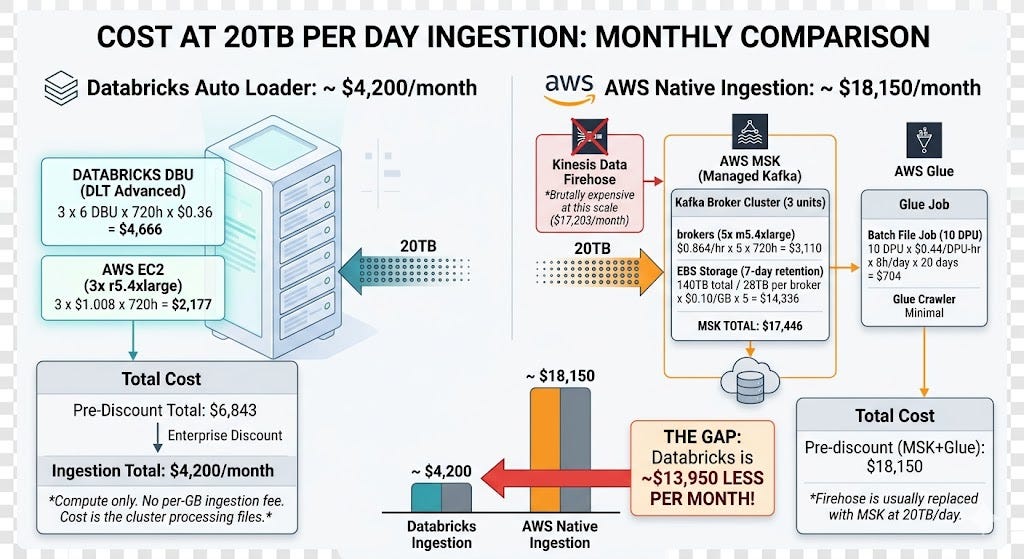
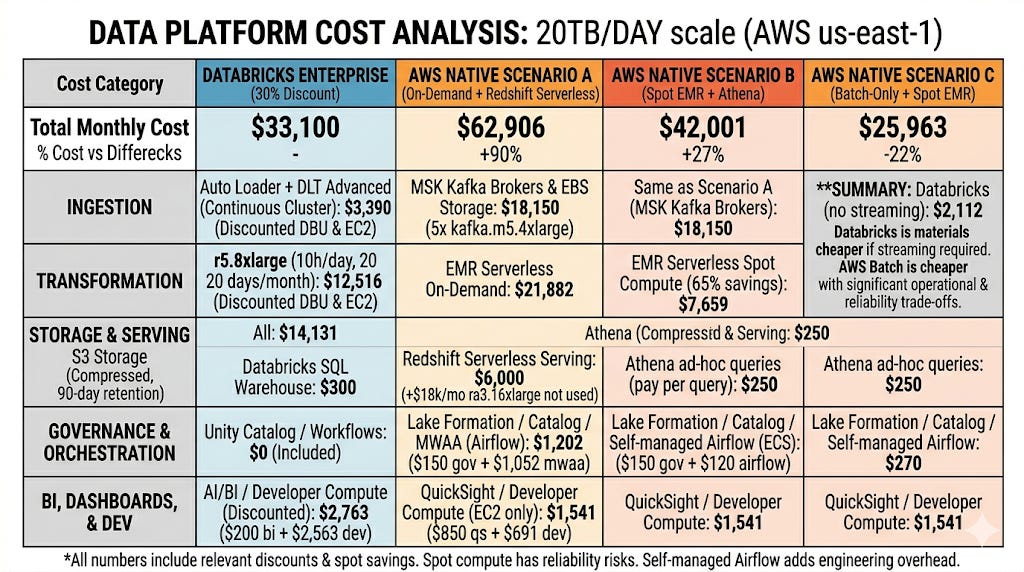
This is the largest single cost difference in the entire comparison and the one most people miss when evaluating the two platforms. Kafka on MSK with 7-day retention and the EBS storage that comes with it is expensive. Auto Loader on Databricks is just compute.
Critical assumption: If you only need batch ingestion and not streaming, AWS Glue alone is $704/month versus Databricks Auto Loader at roughly the same compute cost. The gap collapses for pure batch. It opens wide for streaming.
TRANSFORMATION
Where 20TB of raw data becomes something a business analyst can actually use without crying.
DATABRICKS
Databricks runs Spark. Specifically it runs Databricks Runtime which is a heavily optimised fork of open source Spark, plus Photon, a vectorised query engine written in C++ that replaces the JVM-based Spark SQL engine for eligible operations.
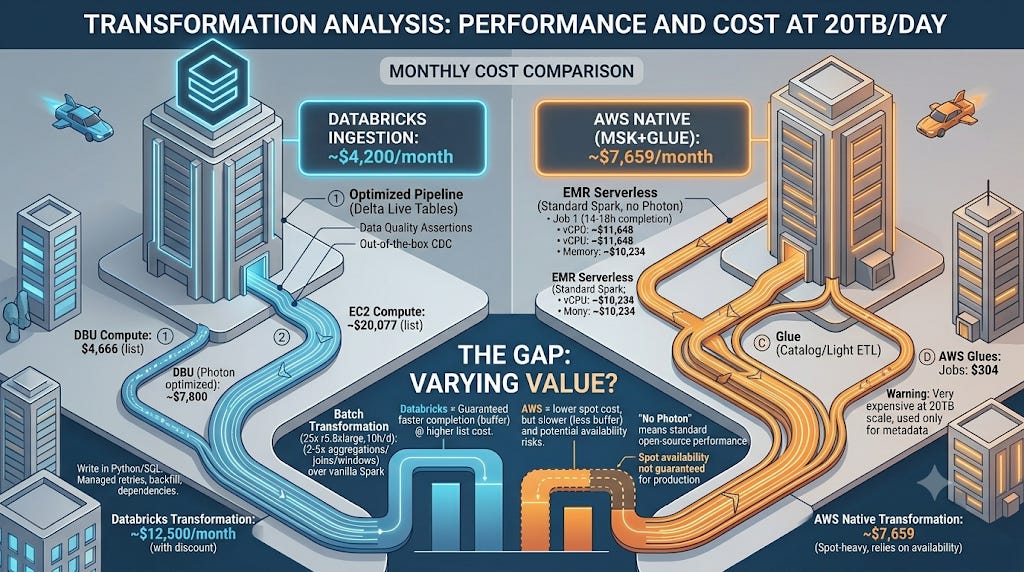
Photon is not marketing. Multiple independent benchmarks show 2 to 5x speedup on aggregations, joins, and window functions compared to vanilla Spark. At 20TB per day that speed difference means either smaller clusters or faster completion times. Both translate to money.
Delta Live Tables adds pipeline orchestration, data quality expectations (think assertions on your data that fail loudly instead of silently corrupting downstream tables), and CDC (change data capture) support out of the box.
You write Python or SQL. Databricks handles dependency resolution, retries, and backfill.
AWS NATIVE
EMR Serverless is AWS’s managed Spark option. You submit a job, it spins up the compute, runs, scales down. No cluster management. Supports Spark 3.x, Hive, Presto.
What it does not have is Photon. You are running standard open source Spark which is fine but not faster than fine.
AWS Glue is available for smaller transformations. It uses a DPU (Data Processing Unit) model and is convenient for light ETL but becomes expensive and slow for heavy transformation at 20TB/day scale. Most data teams at this volume end up using Glue for cataloguing and metadata, not for the actual transformation work.
PERFORMANCE AT 20TB
Databricks with Photon: transforms 20TB in approximately 8 to 10 hours on a 25 node r5.8xlarge cluster
EMR Serverless without Photon: the same workload takes approximately 14 to 18 hours on equivalent compute, or you scale the cluster proportionally
This is not a minor difference. A 20TB job that finishes at 4am leaves buffer for reruns. One that finishes at noon does not.
LOAD
DATABRICKS
Delta Lake is the load destination on Databricks and it is genuinely good. ACID transactions on object storage (S3, ADLS, GCS) means your writes are atomic. A failed job does not leave half-written partitions that corrupt your downstream dashboards. Time travel means you can query any historical version of a table going back to your configured retention window. MERGE operations for upserts are native and performant.
At 20TB per day the practical implication is: you land data into Bronze (raw), Silver (cleaned), and Gold (aggregated) layers in Delta format. Each layer is queryable immediately after write. No ETL window, no read lock, no coordination required between writers and readers.
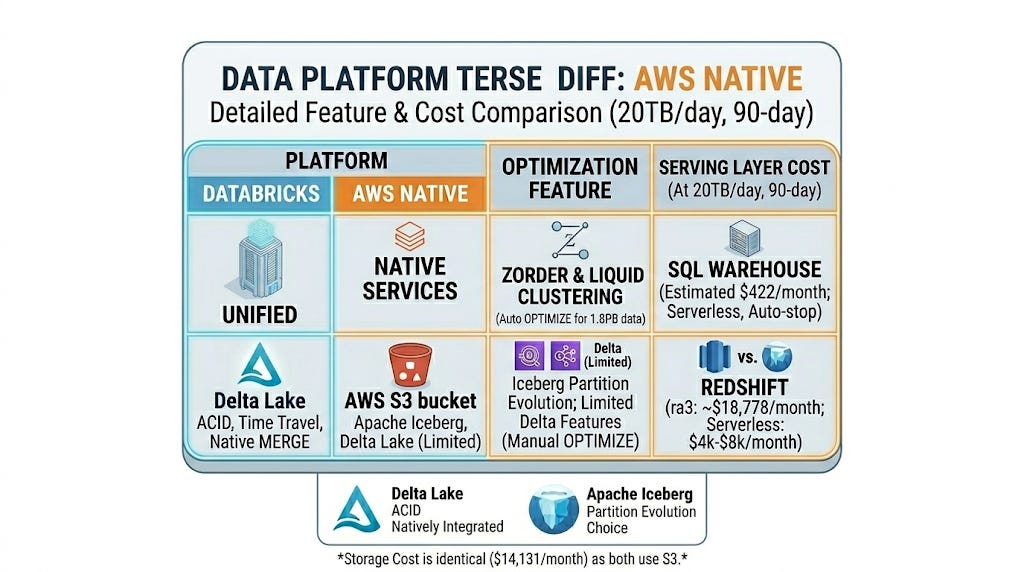
ZORDER clustering and liquid clustering (available in Databricks Runtime 13+) automatically optimise file layout for your most common query patterns. On a 20TB/day dataset with 90 days retention that is roughly 1.8PB of managed data. Liquid clustering handles that without you running manual OPTIMIZE jobs.
AWS NATIVE
AWS does not have a single equivalent. You land data in S3 as Parquet or ORC and you choose your table format.
Apache Iceberg on S3 with EMR: ACID transactions, time travel, partition evolution. Solid choice. Supported natively by Athena, EMR, and Glue.
Delta Lake on S3 with EMR: also supported but not as tightly integrated as on Databricks. You lose some of the automatic optimisation features.
Redshift as the load destination: traditional warehouse approach. Fast for BI queries, expensive for storage at this scale, requires COPY commands for bulk load, and does not handle semi-structured data gracefully without transforming it first.
DATA ACCESS
Who can query what, how fast, and without accidentally reading someone else’s salary data.
DATABRICKS
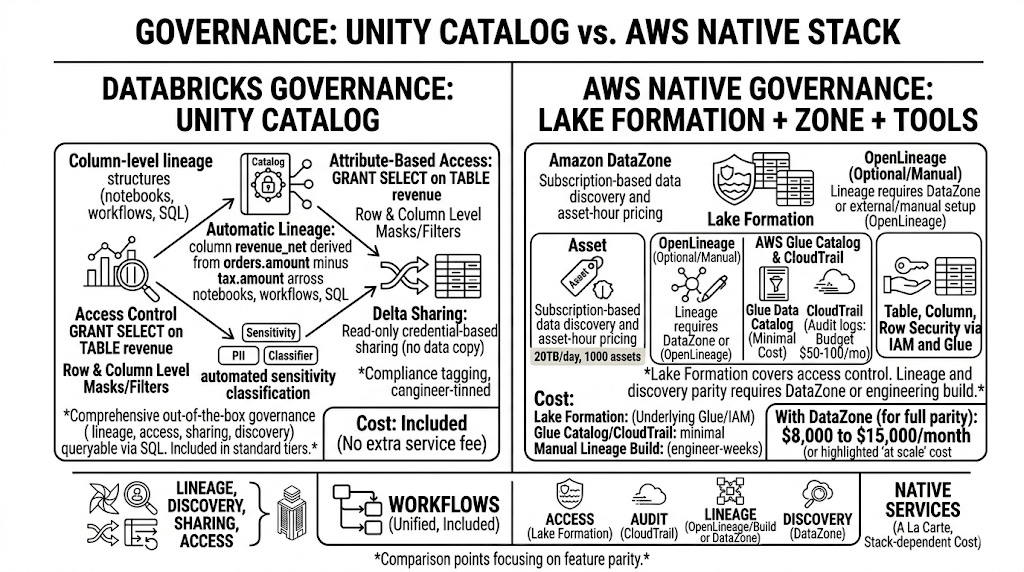
Unity Catalog is Databricks’ unified governance and data access layer. One catalog. All your tables, volumes, models, and functions. Access control is a single GRANT statement. Row-level and column-level security are built in and enforced at the engine level, not the application level.
At 20TB per day with multiple teams reading the data, this matters. A data scientist should not be able to query the PII column in the customer table. A business analyst should not see raw transaction records. Unity Catalog makes this a five minute configuration, not a three sprint project.
Data sharing across organisations or accounts uses Delta Sharing, an open protocol. No data copying, no replication cost, the recipient queries directly against your Delta tables with their credentials.
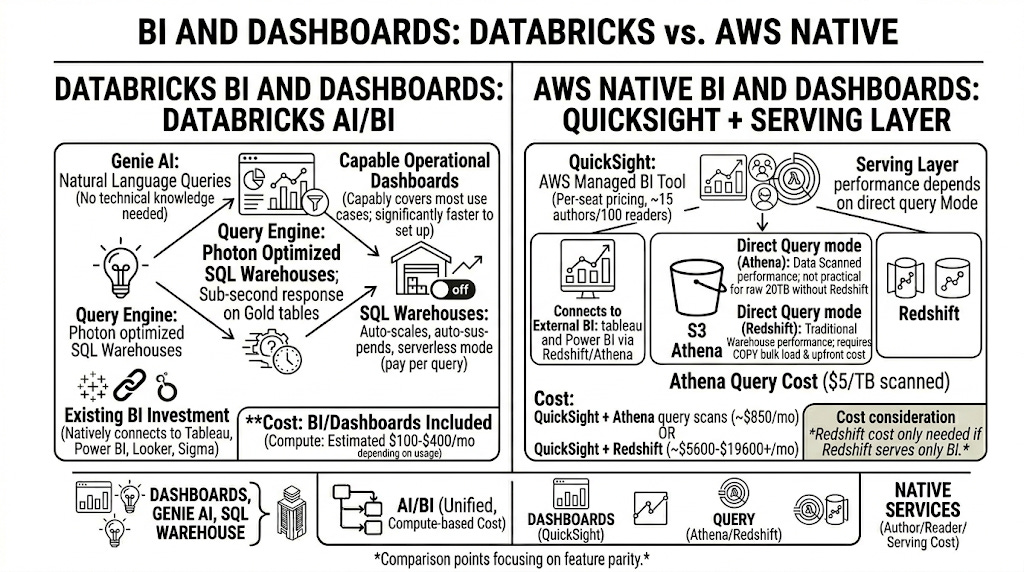
Query performance: Databricks SQL Warehouses use Photon underneath. Queries on your Gold layer Delta tables return in seconds even on hundreds of billions of rows if you have reasonable clustering in place.
AWS NATIVE
Lake Formation handles access control for S3-backed tables. It is more capable than IAM alone but significantly more complex to configure correctly. Column-level security is supported. Row-level filtering requires custom data filters in Lake Formation. Cross-account data sharing requires either Glue Data Catalog replication or Lake Formation data sharing, both of which have edge cases that will cost you an afternoon to debug.
Athena queries S3 directly via Glue Catalog. Performance is solid for ad-hoc queries. For high-concurrency BI workloads it degrades without careful partition management and S3 request throttling becomes a real problem above a few hundred concurrent users.
Redshift Spectrum can query S3 data from within Redshift SQL. Useful if you already have Redshift. Another service to manage if you do not.
PRACTICAL DIFFERENCE AT SCALE
Databricks: one access control system, one catalog, one query engine for all data consumers
AWS Native: Lake Formation for access, Glue Catalog for metadata, Athena for ad-hoc, Redshift for BI queries, potentially Redshift Spectrum for cross-querying. Each with its own quirks, rate limits, and failure modes.
This is not a cost difference. It is an operational complexity difference that becomes a cost difference when you count the engineer hours spent debugging cross-service permission errors.
ORCHESTRATION
Making sure your 20TB moves in the right order, retries when it fails, and does not silently succeed while producing wrong answers.
GOVERNANCE
Data lineage, access control, compliance, and the art of knowing where your data came from when the auditor asks.
BI AND DASHBOARDS
Getting the data in front of the people who make decisions, without them needing to know what a partition is.
AI
Natural language data querying, or: asking your data a question in plain English and getting an answer instead of a SQL error.
Databricks Genie AI: Natural-language querying directly against Delta Lakehouse data, enriched by Unity Catalog metadata and with full SQL transparency.
Amazon Q in QuickSight: Natural-language querying against QuickSight datasets, best suited for organisations already invested in the QuickSight ecosystem.
Practical difference: Genie sits close to the data platform; Amazon Q sits close to the BI layer and often requires an additional SPICE or Redshift serving step.
COST ANALYSIS
All the numbers in one place. Finally.
TIME TO GO LIVE
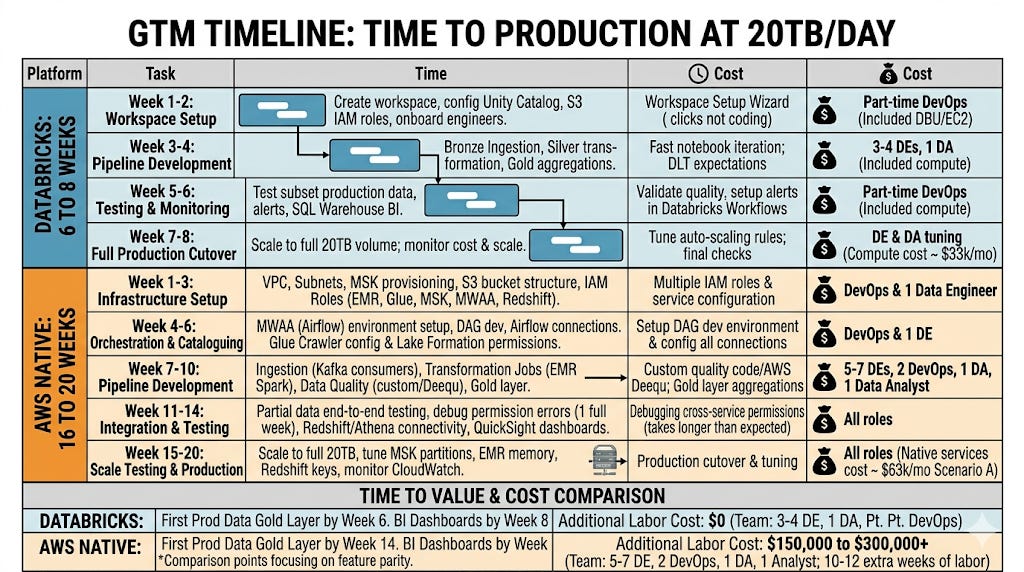
How long before your first production pipeline is running at 20TB per day.
VERDICT
What you should actually do with all of this.
The scorecard by category:
Ingestion at scale: Databricks wins. MSK storage at 20TB is expensive.
Transformation speed: Databricks wins (Photon). EMR on spot can match on cost but not on performance.
Load and storage format: Draw. Both land in S3. Delta is marginally better maintained on Databricks.
Data access and governance: Databricks wins. Unity Catalog versus building your own governance layer is not a close comparison.
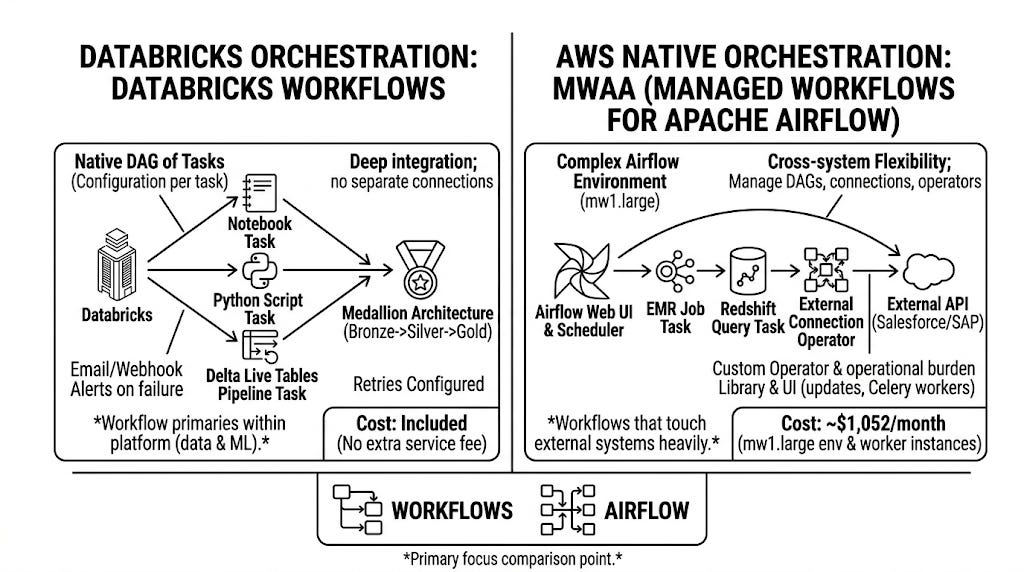
Orchestration: Draw if you want Airflow. Databricks if you want zero additional cost.
BI and dashboards: Draw if you bring your own tool. Databricks if you want a built-in option.
Genie AI: Databricks. AWS Q in QuickSight is not equivalent at this data architecture level.
Time to go live: Databricks by 10 to 12 weeks.
Maintainability: Databricks. One platform versus six services is not comparable on operational overhead.
Integrations: Draw. Both integrate broadly. Databricks has an edge on open data formats and non-AWS ecosystems.
Pure compute cost (batch only, spot): AWS Native wins.
Both platforms will process your 20TB. Only one of them will also process your engineers.
Fin :)